How To Secure a New Phone Before You Start Using It
A new phone often feels clean, fast, and harmless.
That is exactly why it is one of the best moments to make good security decisions.
Most people do the opposite. They rush through setup, tap “allow” on whatever appears, restore everything without checking what they are bringing back, sign into every account, and only think about privacy later when the phone is already full of apps, notifications, saved passwords, location history, and years of personal activity.
By then, changing the setup feels annoying.
At the beginning, it is much easier.
That is why securing a new phone matters so much. A phone is not just another gadget. It is usually the device closest to your identity. It holds messages, email, photos, payment apps, account recovery methods, location history, documents, and often the second factor used to protect everything else.
If a laptop is important, your phone is often even more central.
So this guide is about what to do before your new phone quietly becomes the key to your digital life.
Start with the right mindset
The biggest mistake people make with a new phone is treating setup like a formality.
It is not.
The first hour with a new device often decides:
- which accounts will anchor it
- what data will sync automatically
- which apps will get early trust
- what permissions will become normal
- how easy the phone will be to recover if it is lost
- how much private data it will start collecting immediately
That means setup is not just activation. It is policy.
If you approach it that way, your decisions get better very quickly.
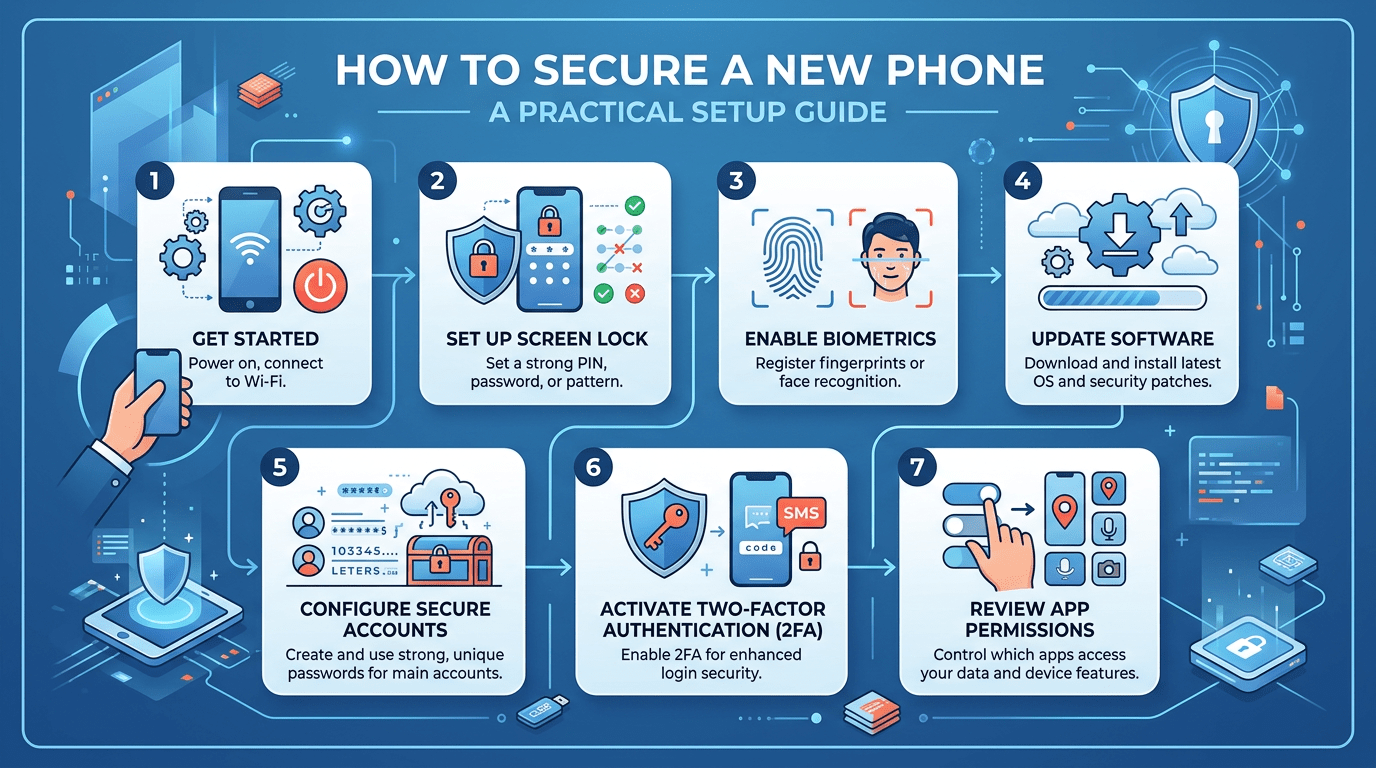
First, update the phone before doing much else
A new phone may still need system updates, app store updates, or security patches even if it just came out of the box.
That matters because “new” does not always mean “fully current.” Depending on when the device was packaged, shipped, and sold, it may still be behind.
Before loading it up with your real life, do the basics:
- connect to a trusted network
- update the operating system
- update built-in apps
- restart if needed
- make sure the latest security patches are installed
This is not exciting, but it is one of the simplest ways to avoid starting your new device from an older security baseline.
Secure the lock screen properly
A phone lock method is one of the most important decisions you make.
It should be strong enough to protect the device if it is lost, borrowed, or briefly in the wrong hands, but practical enough that you will actually use it consistently.
For most people, that means:
- a strong PIN or passcode
- biometrics if you are comfortable using them
- avoiding weak, guessable patterns
- avoiding easy shortcuts that trade too much security for convenience
Your lock screen is not just about stopping strangers from opening the phone. It also protects the apps, messages, photos, accounts, and login approvals inside it.
A weak lock screen on a phone is a much bigger problem than many people realize.
Be careful with restore and transfer options
When moving from an old phone to a new one, the restore process feels convenient.
And it is.
But it can also bring forward a lot of digital clutter without giving you much chance to stop and ask whether you still want it.
That may include:
- old apps you do not trust anymore
- excessive permissions
- saved sessions
- outdated accounts
- notification noise
- browser clutter
- old files and screenshots
- risky defaults you forgot to review years ago
Restoring everything exactly as it was may be fast, but it is not always the cleanest security choice.
Sometimes a better approach is to restore the essentials, then review what you actually want back instead of automatically rebuilding every old habit onto a new device.
Think carefully about your main account
Most phones are tied closely to one major ecosystem account. That may be your Google account, Apple account, or another central identity linked to backups, sync, app purchases, location history, account recovery, and device management.
This account matters a lot because it often controls:
- cloud backup
- device recovery
- app store access
- photo syncing
- password syncing
- calendars
- notes
- find-my-device tools
Before going much further, make sure that central account is well protected.
That means checking:
- the password
- two-factor authentication
- recovery email
- recovery phone number
- trusted devices
- old sessions you no longer recognize
A secure phone built on top of a weak primary account is not as secure as it looks.
Review what you actually want to sync
One of the quietest privacy decisions on a new phone is sync.
Many people leave everything turned on because setup flows are designed to feel effortless. But sync is not all-or-nothing. It often covers a long list of personal data categories, and not all of them deserve automatic trust by default.
Depending on your setup, your phone may try to sync:
- contacts
- photos
- notes
- browser history
- passwords
- app data
- location history
- messages
- documents
- voice activity
- device backups
Some of that may be useful. Some may be more than you want.
The point is not to turn everything off blindly. It is to stop and decide which kinds of convenience are actually worth the privacy trade-off for you.
Install apps more slowly than you want to
A new phone makes people reinstall apps quickly, often before they think about which ones they still need.
That is one of the easiest moments to improve your privacy and security without much pain.
Instead of reinstalling every old app in one wave, ask:
- Do I still use this?
- Does it still deserve access to my phone?
- Is this app likely to ask for permissions I no longer want to give?
- Is there anything here I only kept out of habit?
A smaller app footprint is usually easier to secure.
It means fewer permission prompts, fewer notifications, fewer background processes, fewer update risks, and fewer accounts quietly living on the device.
New-device setup is one of the best chances you get to reset that footprint.
Pay attention to permissions early
App permissions become much easier to ignore once dozens of apps are installed.
Early setup is the best time to be deliberate.
Pay special attention to:
- location access
- contacts access
- camera access
- microphone access
- photos and media access
- Bluetooth access
- background activity
- notification access
Many apps ask for more than they need because asking is easy and most people tap yes.
That does not mean every permission is malicious. It means permission review should be a real part of setup, not something you promise to think about later and never revisit.
Set up backups without becoming careless
A phone backup is important. If the device is lost, stolen, damaged, or reset, a backup can save you a lot of pain.
But backup should not be treated like a vague magic layer that solves everything automatically.
You should know:
- whether backups are turned on
- what they include
- where they go
- what account controls them
- whether that account is protected well enough
This matters because backups often hold a lot of the same information you are trying to protect on the phone itself. A weakly protected backup account can quietly become another weak point.
A good backup is not just “on.” It is understood.
Turn on device-finding and recovery tools
This is one of the most practical parts of phone security and one of the easiest to forget when everything is working normally.
Make sure the device can be:
- located if lost
- remotely locked if needed
- remotely erased if recovery is unlikely
These tools matter because phones are mobile, personal, and easy to misplace at the worst times. Recovery tools do not just help with theft. They help with ordinary loss, panic, and bad timing.
A new phone should not become your main device without a recovery plan.
Review notification privacy before life starts piling in
Notifications are one of the fastest ways phones leak information in daily life.
Messages, payment alerts, email subjects, delivery updates, and account warnings can all appear on the lock screen if you leave the defaults wide open.
That may sound small until the phone is on a desk, in a shared room, borrowed briefly, or visible in the wrong moment.
A good new-phone setup should include a quick decision about:
- what appears on the lock screen
- which apps can preview content
- which alerts should stay private until the device is unlocked
You do not need to make the phone silent. You just do not need every message preview visible by default.
A real-world example
Imagine someone buys a new phone and restores everything automatically from the old one.
Within an hour, the new device has:
- old apps they do not use anymore
- browser sessions already signed in
- shopping apps with saved payment details
- years of notifications and account habits restored
- location access granted to apps they forgot about
- a main email account tied in, but with outdated recovery settings
- cloud sync turned on for everything
The phone works. It feels familiar. It also inherits a lot of old risk.
Now imagine a different setup where the person updates the phone first, secures the lock screen, reviews the main account, restores selectively, installs fewer apps, and checks permissions as they go.
That phone is not perfect, but it starts from a much stronger place.
That difference matters.
A practical new-phone security checklist
If you want the short version, start here:
Before full setup
- install system updates
- secure the lock screen
- enable device recovery tools
Before restoring everything
- review your main account security
- check recovery email and phone number
- confirm two-factor authentication is enabled
During app setup
- install only what you still need
- review permissions carefully
- avoid giving every app full access by default
Before daily use
- review notification privacy
- understand your backup settings
- remove old trusted devices or stale sessions from key accounts
That is already enough to make a big difference.
The bigger lesson
A new phone is not just a new device.
It is a rare clean start.
Most of the time, people try to improve digital security after years of habits, clutter, and compromise between convenience and caution. A new phone is one of the few moments where better defaults are easy to set before the mess builds up.
That is why this moment matters so much.
Final thought
The safest phone is not the one with the most expensive hardware or the most impressive marketing.
It is the one that starts with deliberate choices.
If you treat setup like a real security moment instead of a box-ticking exercise, you can avoid bringing old digital baggage into a new device. That means fewer unnecessary apps, fewer silent permissions, fewer inherited risks, and a much clearer understanding of what your phone is doing for you from the start.
That is a better foundation than trying to fix everything later.